Over the past few years, Large Language Models (LLMs) have changed how we interact with computers. Instead of navigating interfaces or reading documentation, we simply describe what we want in natural language.
The next step, agentic AI, goes further: Agents do not just respond to questions; they act. They write code, build projects, run tests, and can execute programs directly on our systems. And that is where things become interesting, and risky!
An AI agent is no longer “just a chatbot”. It becomes an autonomous program executing arbitrary instructions on our system. That raises a simple but important question:
Would we run arbitrary, dynamically generated, unaudited code directly on our host system?
Probably not. Yet this is exactly what we allow when we let agents execute commands without isolation.
Let’s be safe and isolate AI agent execution using microVMs, but with
the familiar container. workflows. In this post, we will see how we can
docker build and docker run a microVM and run the agent inside it.
The Threat Model: Treat Agents as Untrusted Code Link to heading

Initially, LLMs were used in a simple request-response pattern: we asked questions and received answers. In software development, those answers often included code snippets or shell commands that we manually copied from the browser and pasted into our editor or terminal.
AI agents remove the middle (hu)man. Instead of suggesting commands, they execute them. Instead of proposing code, they write it directly to disk. However, this also removes the audit step (if anyone was actually doing it) when copying commands or code from the browser.
As a result, agents can execute the instructions they receive directly. They can read and write files, execute arbitrary shell commands, create and run new applications, modify system configuration and even interact with external services; all without explicit human review. And that can turn ugly very quickly.
Agents do not rely only on user input. They also consume content from external sources (repositories, documentation pages, forums, blogs, etc.). They cannot reliably distinguish between safe and harmful instructions; they simply follow what appears relevant in the current context. Therefore, what an agent executes on our machine can be highly influenced from external (and sometimes) malicious sources.
An example of the above scenario is a recent backdoor in a Skill for openclaw. In fact, Snyk published research showing that 36.82% of AI agent “skills” contained at least one security flaw. Even setting aside the security hole called openclaw, both Anthropic and OpenAI have publicly acknowledged that prompt injection attacks remain a real and unresolved challenge in agent security.
From a systems perspective, once an agent can execute code, it effectively becomes an untrusted program running on our system. This is not fundamentally different from the cloud model, where users submit arbitrary workloads and cloud providers must isolate and protect the infrastructure and other tenants from potentially malicious or buggy code.
Some agents attempt to mitigate this risk by restricting file access, limiting which commands can be executed, or running them inside some form of sandbox. However, these controls are often implemented at the application level. They may be bypassed due to bugs, or misconfigurations, or simply because the agent itself is closed-source and opaque. In practice, we are asked to trust that the agent will respect the boundaries we configure.
But cloud providers do not rely on trust when running untrusted workloads. They enforce strong isolation boundaries (from containers to VMs). If they do so, we should not let AI agents run freely on our host systems either.
Workload isolation Link to heading
Fortunately, isolating untrusted workloads is a well-studied problem and there are various mechanisms we can use.
Containers Link to heading
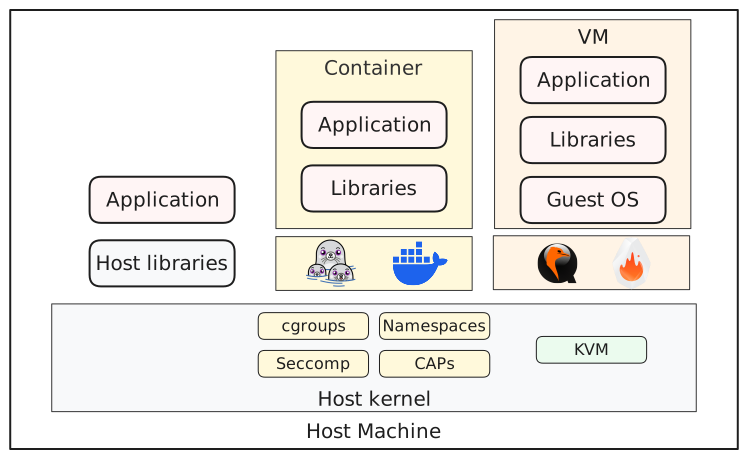
Containers have become the de facto packaging and deployment mechanism for cloud applications. They restrict an application’s access to the host using Linux kernel features such as namespaces, cgroups, capabilities, seccomp and others. They are lightweight, easy to use and distribute, and therefore a good candidate for packaging and creating a restricted execution environment for an AI agent.
However, all containers on a host share the same kernel.
While this may not pose a threat in some scenarios, it can be a serious risk under the threat model described above. A single vulnerability in the kernel or container runtime can potentially lead to container escapes.
Virtual Machines Link to heading
Virtual Machines (VMs) provide the strongest isolation boundary available on a single host. Using hardware virtualization features, hypervisors create an environment where a separate operating system can boot. Applications inside the VM interact only with the guest kernel, not the host kernel. This creates a much stronger separation.
Traditionally, VMs came with performance overhead and slow boot times. but the introduction of microVMs in recent years has changed that. Unlike traditional VMs, microVMs make use of specific devices and configurations to decrease their size and overhead. This has led to the adoption of microVMs in serverless and multi-tenant cloud environments.
On the other hand, (micro)VMs typically increase the operational complexity and their day-to-day workflow does not match the container UX. (Micro)VMs require a kernel and a root filesystem to boot, and tasks like attaching volumes and setting up networking with Internet access typically involve extra steps.
Sandboxed Containers Link to heading
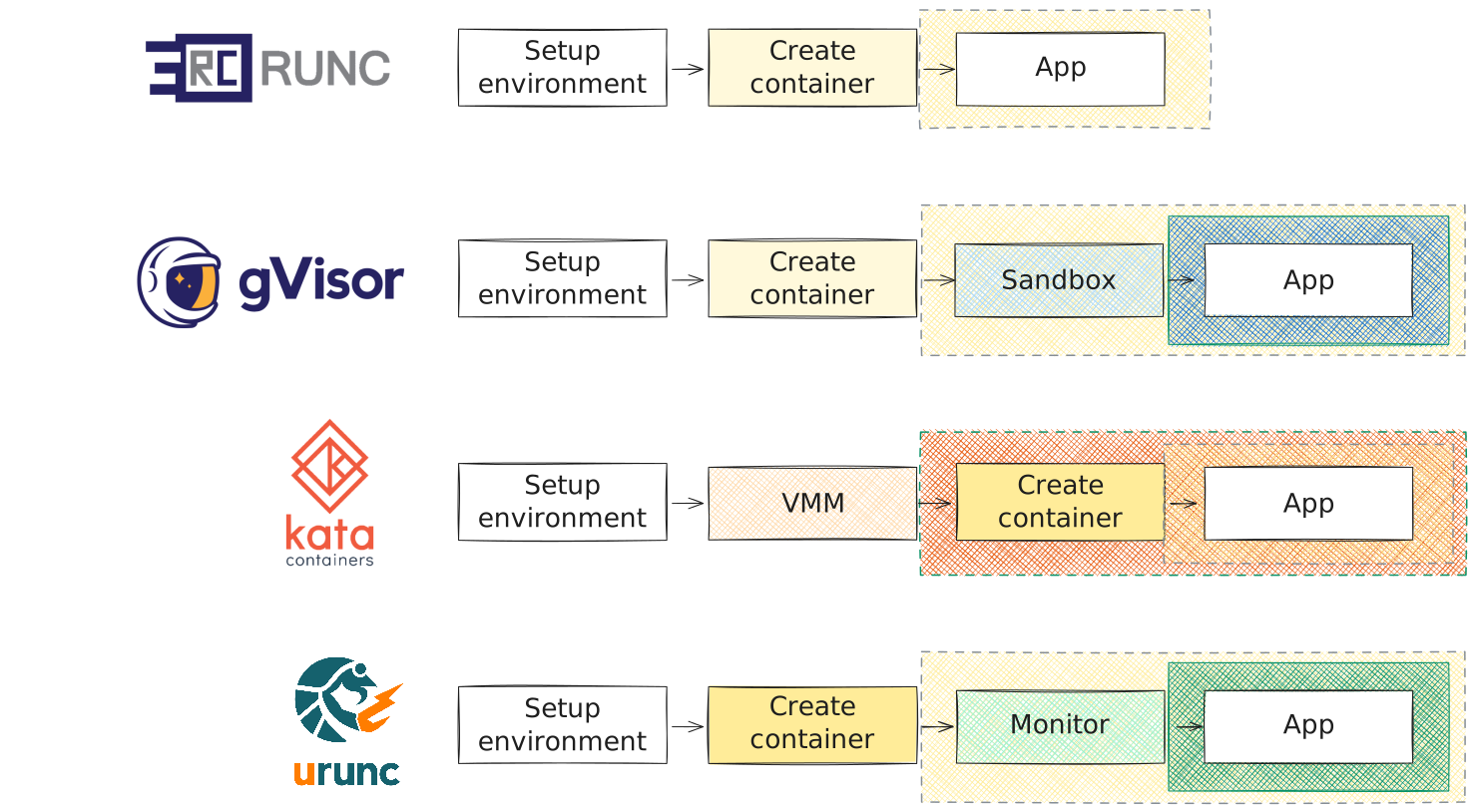
Of course, people have recognized that containers are great for packaging and deploying applications, but microVMs offer stronger isolation. As a result, solutions that combine these technologies, as well as other software-based sandboxing approaches, have emerged. These solutions are referred to as sandboxed container runtimes and they aim to provide stronger isolation while preserving the familiar container workflows and tooling.
In the case of microVMs, Kata Containers is a container runtime that, instead of directly spawning a container on the host, spins up a microVM and runs the container inside it. Kata Containers provide its own Linux kernel and root filesystem, but users can configure the runtime to use a custom kernel and/or rootfs.
In the case of software-based sandboxes, gVisor is a container runtime that spawns an application kernel alongside the container. This application kernel mediates between the container and the host system: it intercepts system calls from the container, implements as many as possible itself, and forwards the rest (for example, I/O-related calls) to the host.
In this post, we will discuss the new kid on the block in sandboxed container
runtimes: urunc. Unlike the runtimes mentioned above,
urunc is designed to isolate only the untrusted parts of a deployment. In a
Kubernetes context, this means that instead of running the entire pod in a
sandbox, only the untrusted parts run in a sandbox inside the pod,
alongside trusted components that run as regular containers.
The spawning time of containers with VM level isolation and minimal overhead Link to heading
The idea behind urunc is that the sandbox should be as small as possible and
contain only the untrusted parts of a deployment. Therefore, urunc does not
require any additional components running inside or alongside the sandbox.
Subsequently, it can support both software- and VM-based sandboxes, along with a
variety of guest types, from unikernels to more general-purpose kernels like
Linux and BSD. Think of it as spawning a microVM using the container’s rootfs ,
with the container entrypoint running as init.
The sandbox, that urunc creates, runs as a Linux container and it
integrates seamlessly with container workflows. We can create, start containers
as simply as docker run, get network access as a container, and
attach volumes as with any other container.
Thanks to its design urunc can achieve comparable spawn times to normal
containers and introduces minimal overhead. Check out the past talks and
publications
for comparisons with other sandboxed container runtimes.
In the context of agents, urunc can be used in two ways:
a) as a sandbox for the entire agent. or b) as a sandbox for a
specific application executions triggered by the agent.
In this post we will describe the first approach and run an agent inside a
urunc container. Stay tuned for the second approach.
Let’s try it out.
Isolating AI agents execution with urunc Link to heading
To showcase how we can use urunc to isolate an AI agent, we will use as an
example opencode, but the instructions below can be
adapted for any agent. Overall, we just need to set up the urunc environment,
build the container images, and run them.
Step 0: Setting up the environment Link to heading
Assuming we already have a working docker / containerd installation, we can install
urunc and its shim as easily as fetching the binaries from the latest release:
1# or for the latest release
2URUNC_VERSION=$(curl -L -s -o /dev/null -w '%{url_effective}' "https://github.com/urunc-dev/urunc/releases/latest" | grep -oP "v\d+\.\d+\.\d+" | sed 's/v//')
3
4URUNC_BINARY_FILENAME="urunc_static_$(dpkg --print-architecture)"
5wget -q https://github.com/urunc-dev/urunc/releases/download/v$URUNC_VERSION/$URUNC_BINARY_FILENAME
6chmod +x $URUNC_BINARY_FILENAME
7sudo mv $URUNC_BINARY_FILENAME /usr/local/bin/urunc
And for containerd-shim-urunc-v2:
1CONTAINERD_BINARY_FILENAME="containerd-shim-urunc-v2_static_$(dpkg --print-architecture)"
2wget -q https://github.com/urunc-dev/urunc/releases/download/v$URUNC_VERSION/$CONTAINERD_BINARY_FILENAME
3chmod +x $CONTAINERD_BINARY_FILENAME
4sudo mv $CONTAINERD_BINARY_FILENAME /usr/local/bin/containerd-shim-urunc-v2
For more detailed installation instructions see the installation guide of
urunc. The guide contains also instructions
to download the latest build of the main
branch.
As previously mentioned, urunc supports a variety of software- and VM-based
sandboxes.
For simplicity, this post focuses on a VM-based sandbox using Linux and QEMU.
We will also use virtiofs to share data
between the host and the VM. As a result, we will need to install QEMU and
virtiofsd.
We can install them either via our distribution’s package manager or by downloading pre-built artifacts from the monitors-build repository. For more details, refer to the respective section of the installation guide
Step 1: Creating the Container image Link to heading
In this step, we define the environment in which the agent will run. We will
do that with a Containerfile. For example, we can create a Go dev environment
based on the container image of opencode with the following Containerfile:
1FROM ghcr.io/anomalyco/opencode
2
3RUN apk add git go
4
5WORKDIR /app
We can build the container image with:
1docker build -f Containerfile -t go-dev-opencode:normal .
To make the container image above compatible with urunc, we need to include a
Linux kernel for the VM and set a few urunc -specific OCI annotations. In
addition, to configure the execution environment inside the VM (UID/GID, working
directory, etc.), we will use a custom init called
urunit.
This is optional but recommended. As mentioned earlier, urunc does not require
any additional components inside the sandbox; however, if our workload expects
to run in a specific setup (UID/GID, working directory, etc.), someone needs to
set this up, and that is what urunit provides.
While this may sound like a lot of work, we can handle it without installing
extra tooling by using bunny.
It is a
buildkit frontend that works directly with
docker build.
Bunny can parse two types of files: a) the standard Containerfile
and b) a YAML-based file specific to bunny called
bunnyfile.
Using either type, we can add the kernel, urunit and set the required annotations.
Bunny with Containerfile Link to heading
For simplicity we have created a bunny variant that can get an existing
Containerfile and build an image compatible with urunc.
To use it we simply need to prepend the following line in Containerfile:
#syntax=harbor.nbfc.io/nubificus/bunny:containerfile.
The new Containerfile:
1#syntax=harbor.nbfc.io/nubificus/bunny:containerfile
2FROM ghcr.io/anomalyco/opencode
3
4RUN apk add git go
5
6WORKDIR /app
We can build it exactly as before with:
1docker build -f Containerfile -t go-dev-opencode:containerfile .
Bunny with bunnyfile Link to heading
For users who want more control over the kernel and the init, we recommend
using the bunnyfile format. This approach involves two build steps, one for
the base container and one using bunny to make the image urunc compatible.
The first steps uses the standard Containerfile, while the second uses a
bunnyfile.
We assume that the first step has been done using the Containerfile
above. For the second build, we can use the following bunnyfile:
 1#syntax=harbor.nbfc.io/nubificus/bunny:latest
 2version: v0.1
 3
 4platforms:
 5  framework: linux
 6  monitor: qemu
 7  architecture: x86
 8
 9rootfs:
10  from: go-dev-opencode:normal
11  type: raw
12  include:
13  - from: harbor.nbfc.io/nubificus/urunit:latest
14    source: /urunit
15    destination: /urunit
16
17kernel:
18  from: local
19  path: kernel
20
21entrypoint: ["/urunit"]
22
23cmd: ["opencode"]
In the above bunnyfile, we specify:
- a
urunccontainer image targeting Linux over Qemu in x86 architecture. - with a rootfs based on the container image we created before appending the
urunitbinary from the latesturunitcontainer image. - with a kernel which resides locally under the name
kernel. - with
/urunitandopencodeas entrypoint and cmd respectively.
We can build it simply with docker:
1docker build -f bunnyfile -t go-dev-opencode:bunnyfile .
Step 2: Running the container Link to heading
To run the containers we built in the previous steps, we can simply:
1docker run -m 1024M --rm -it go-dev-opencode:normal
and opencode TUI will open.
Running a urunc container follows the same workflow; simply add the --runtime io.containerd.urunc.v2 cli option when starting a container from either a
bunnyfile-based or Containerfile-based image.
1docker run -m 1024M --rm --runtime io.containerd.urunc.v2 -it go-dev-opencode:bunnyfile
That’s it! We have created a VM that can run arbitrary workloads using the root filesystem we defined when building the container image.
Hint: Use the web interface of opencode and expose its port to the host with
-p <PORT>:<PORT>to avoid issues with the console.
Step 3: Sharing data with the host Link to heading
In a normal container we can share a host directory with the container with:
1docker run -m 1024M --rm -v ${PWD}/mydir:/mydir -it go-dev-opencode:bunnyfile
In a urunc container nothing changes, except of specifying the runtime:
1docker run -m 1024M --rm --runtime io.containerd.urunc.v2 -v ${PWD}/mydir:/mydir -it go-dev-opencode:bunnyfile
and now we have mydir in the VM’s rootfs and everything is shared, but use
with caution.
What urunc protects us from
Link to heading
Like other sandboxed runtimes, urunc isolates untrusted code from the host
system. As a result, urunc will protect our host’s filesystem, kernel and
other processes, making a container escape to the host significantly more difficult.
However, isolation is not magic. If we explicitly share data or resources with
a urunc container, that data is no longer protected. Untrusted code can still
delete files, leak data, or misuse whatever access we grant it.
urunc provides a strong boundary, but the security policy is still controlled
by us (the users).
Hands-on example Link to heading
As an example, we captured an end-to-end execution of opencode running inside
a QEMU VM with urunc. In this demo, we use the container images built earlier
and instruct opencode to create a Go server that responds to HTTP requests with
random messages.We also share a directory with the urunccontainer; within
that directory, opencode initializes a Git repository and commits the changes.
Final Thoughts Link to heading
AI agents blur the line between “tool” and “program”. Once they execute code, they should be treated as untrusted workloads.
Containers made deployment easy, but for agentic execution, a shared kernel
might not be enough. Virtual machines provide the right boundary and with
sandboxed container runtimes like urunc, they can be managed as easily as
containers.
If agents are going to run code on our system, they should not run on our host.
Use them with caution.